Icon of program: Cameyo

Cameyo for Windows

  • Free
  • 3.9
    64
  • 18.9K
  • V3.1.1446
Free Download for Windows

View an ad to download for free

Create Portable Apps with Cameyo Application Virtualisation

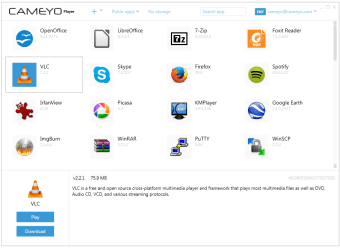
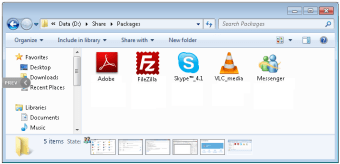
Described as a software teleporter, Cameyo lets you use software without installing it by running virtualised applications through your web browser. This makes lets you discover and try new software by creating portable applications. You can also use software from one operating system on another, like running Windows software on your Mac. Along with a free version for personal use, there are paid commercial versions of the application.

Top Recommended Alternative

Using Cameyo

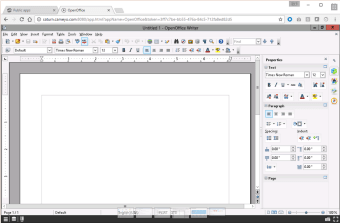
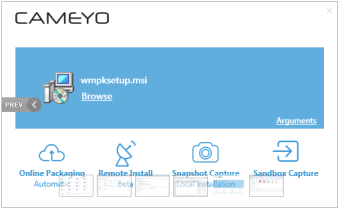
Cameyo is virtualised into a single EXE file, allowing you copy and execute it on your computer without installing the application. You are also able to publish your own software to a dedicate cloud server and run it from any device with a HTML5 browser without any plugins. This function lets you demo your software to other users through your website. It works by first taking a snapshot of your system before installing an application and then another afterwards. The programme then compares the changes to understand what modifications are needed to your system.

Features that set Cameyo apart

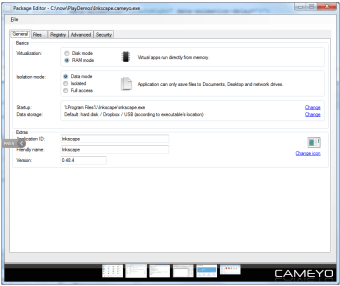
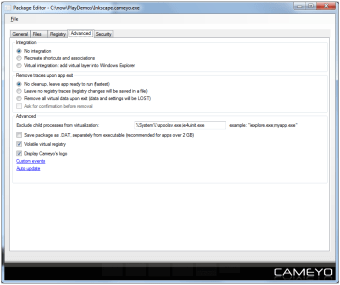
Similar products on the market do not have a lot of the same features as this product, including data encryption, cloud packaging, and virtualisation modes for both RAM and Disk. The application lets you apply user restrictions, such as scripting and passwords. You can also save data and settings on a USB or Dropbox. At the same, it is an affordable alternative to VMware ThinApp and similar programmes.


  • Pros

    • Simple interface and easy to use
    • Allows you to install virtually any app including add-ons to other programs
  • Cons

    • Unable to use your device as snapshots are taken
    • Lacks stability with crashes and errors with some software
 0/6

App specs

  • Developer

  • License

    Free

  • Version

    3.1.1446
  • Latest update

  • Platform

    Windows

    Other platforms (1)
  • OS

    Windows Vista

  • Language

    English

  • Downloads

    18.9K

    Last month's downloads

    • 104
  • Size

    15.14 MB

Also available in other platforms

Program available in other languages


Icon of program: Cameyo

Cameyo for PC

  • Free
  • 3.9
    64
  • 18.9K
  • V3.1.1446
Free Download for PC

View an ad to download for free


User reviews about Cameyo

3.9

2 reviews

Add review

Main reviews for you

  • Anonymous user

    Pretty cool. I like how you can package apps for USB or browser. Sometimes virtualized programs won't work, but you need to try with different apps.
  • Anonymous user

    Great app!. Using this tool, you can make almost any application portable. This allowed me to put it on my USB drive, and even on my Dropbox.Now I surf the Internet with a portable Firefox I made with Cameyo and placed on my Dropbox. Everywhere I go, I can use my browser with my bookmarks, preferences, saved forms etc.Very nice! Pros: Make your apps portable rather than tying them to one specific computer Cons: Updating a portable app isn't simple enough

More

You may also like

Alternatives to Cameyo

Explore Apps

Latest articles

Laws concerning the use of this software vary from country to country. We do not encourage or condone the use of this program if it is in violation of these laws.
Softonic

Is Cameyo safe?

90/100

Score result: Warning

This file has been flagged as potentially harmful or containing unwanted bundled software. Please proceed with caution.

  • Virus free
  • Spyware free
  • Malware free
  • Verified by Security Partners

    VirusTotal logo

Scan Info

Last scan
Sunday, December 31, 2023
Scan provider
VirusTotal · Full report

File Integrity

File
Cameyo.exe
SHA256
1787eead7d6bb0d581139b941474e8c0a5b3c182ef653cac7d527b64d82d2cef
SHA1
9508a1f04408b54f080bc26f071ad2c3c3df7910

Softonic security notice

This software has been thoroughly scanned by our advanced security systems and verified by industry-leading partners. However, one or more antivirus engines have flagged this software with potential risks. While these detections may be false positives, we recommend caution when downloading and installing. Some programs may include unwanted software or behaviors that could affect your device. False positives can occur when safe software is mistakenly flagged as harmful due to overly cautious detection rules or algorithms in antivirus tools. This means the program may still be safe to use, but we advise reviewing the details before proceeding.
Signed in to Softonic as